

Chatbot, Voicebot, Visual IVR… next to social media, you also want information from these channels fully integrated in your CRM application… As a company you want 360° view on all interactions with your customers.
Picture this:
- A customer calls your contact center and ends up in your self-service voicebot
- Your customer answers the questions that get asked by your voicebot nicely
- But, your customer did not get the right feedback after all, and wants to talk with one of your agents
Voicebot
Amazon Web Services allows for easy setup of voicebot (and chatbot) applications via Amazon Lex. Moreover, these voicebot applications may get easily integrated with your Amazon Connect IVR solution as well. So, when you have an Amazon Connect Cloud Contact Center solution, you use the Amazon Lex application in your Contact Flows, similar to when creating normal Contact Flows.
Here is an example of a simple Hotel Booking application:
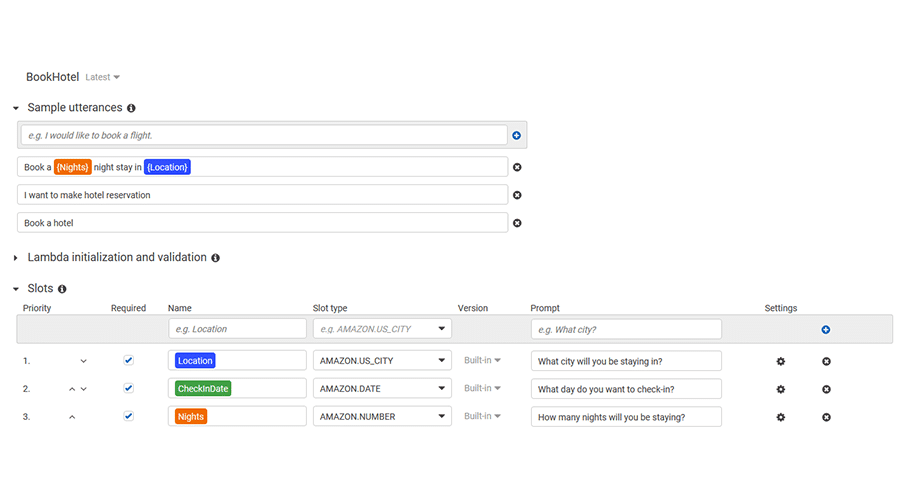
As you see, the caller will get 3 questions:
- What city do you want to stay in?
- What day do you want to check-in?
- How many nights will you be staying?
Customer experience
But obviously, it could happen that your customer didn’t get all answers/data from your self-service voicebot. In such scenario, your customer may get redirected to your contact center. And, for your customer service agent, it is very important to get all relevant information readily available.
The screen below shows you the Contact record that gets pop-up on the agent’s desktop. And you see that the responses that were provided in the voicebot got automatically created in Salesforce. As such, you customer service agent has all data readily available, to continue the conversation with your customer.

Amazon Connect
Implementing Amazon Connect opens a wide range of functionalities. Call recording, retrieving data from different sources to create fully dynamic contact flows, integrating other AWS services – like Amazon Lex, may get easily managed and are just a few of the functionalities that you may use to create the best customer experience.
Depending on the use case, Amazon Connect may easily create (or update) a Case, Lead, or basically a record in any object in Salesforce – like a Lex_HotelBooking record in the example above.






One Comment
Comments are closed.